Getting money out of 1st.game
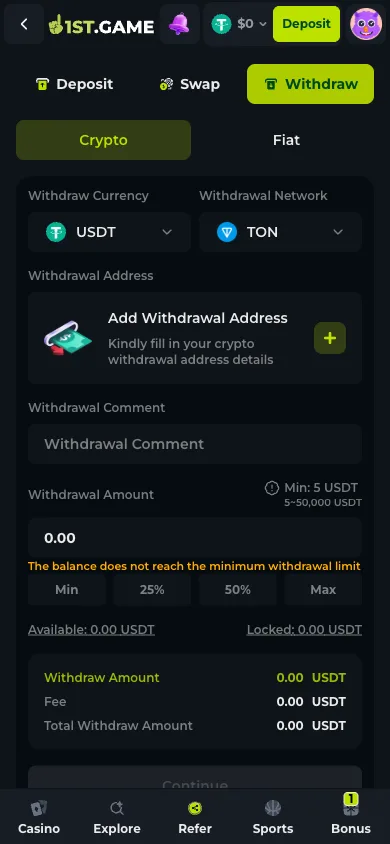
The withdrawal tab sits beside Deposit and Swap on the same finance screen, and the first thing it makes clear is that it will not let you improvise. There is no field to paste a destination into on the spot: the address block reads "Add Withdrawal Address" with a plus button, meaning the payout destination is something you register on the account before it can be used. Beneath that sit the numbers — a floor of 5 USDT and a ceiling of 50,000 for the coin selected on the day, a fee line that fills in as the amount does, and two balances shown side by side rather than as one figure: available and locked. The distinction between those two is where most confusion about a "missing" balance actually lives. Below the button, a line of grey text says that for security reasons large or unusual withdrawals may take up to 24 hours to process. This page describes all of that from the screen itself, and is blunt about the boundary: the account used here never held a balance, so nothing here reports how a real payout behaved.
Contents
- What the withdrawal screen requires
- Step 1 — Open the Withdraw tab
- Step 2 — Register the destination address first
- Step 3 — Check available against locked before entering an amount
- Step 4 — Read the fee and total, then confirm
- Step 5 — Track it in transactions, not in your memory
- Frequently asked questions
What the withdrawal screen requires
Four requirements are visible before any amount is entered. Three of them are worth satisfying on a quiet afternoon rather than at the moment you want the money out.
The payout address is registered, not pasted
The address area is a card reading "Add Withdrawal Address" with a plus button, not an open text field. Registering the destination in advance is a standard protection against an attacker redirecting a payout, and it also means the address is one less thing to get right under time pressure.
Available and locked are separate numbers
The screen prints both. Funds tied to an active bonus or an unmet rollover requirement sit under locked and cannot be withdrawn until the condition clears. A balance that looks larger than what the withdrawal field will accept is usually this, not an error.
A floor, a ceiling, and a fee line
The coin selected on 2026-08-03 showed a range of 5 to 50,000 USDT, with the field refusing amounts under the floor and a message saying so. Fee and total are printed under the amount and update as you type, so the figure that will actually leave is on screen before you commit.
Large or unusual amounts get reviewed
A note under the confirm button states that for security purposes large or suspicious withdrawals may take up to 24 hours to process. Read that as the stated ceiling for a manual check, not as a typical processing time — those are different claims and only the first one is on the screen.
1. Step 1 — Open the Withdraw tab
From the header Deposit button, the finance screen opens on Deposit; Withdraw is the third tab across the top. It keeps the same Crypto / Fiat split, so the route out mirrors the route in. Selecting a coin sets the withdrawal network underneath it, exactly as on the deposit side — and with the same consequence, since the network decides which chain your funds travel on.
2. Step 2 — Register the destination address first
Tap the plus on the "Add Withdrawal Address" card and fill in the crypto destination details. Do this while nothing is pending. The address has to match the network selected above it — a wallet address for one chain is not valid on another, and this is the same class of mistake as sending a deposit on the wrong network, with the same absence of a way back. There is also an optional withdrawal comment field, useful for your own records when several payouts appear in the transaction list later.
3. Step 3 — Check available against locked before entering an amount
The two balance figures sit directly under the amount field. Available is what the withdrawal will draw on; locked is what a bonus condition is still holding. If a claimed bonus carries a rollover requirement, the funds attached to it stay in the second column until the requirement is met, and the shortcut buttons — Min, 25%, 50%, Max — calculate from available, not from the total you think you have. If Max produces a number lower than expected, the gap is the locked column.
4. Step 4 — Read the fee and total, then confirm
Entering an amount fills in three lines: withdraw amount, fee, and total withdraw amount. Read the third one — it is what the network will actually move, and it is the figure to compare against the destination you expect. Below the confirm button, the security note about large or suspicious withdrawals taking up to 24 hours applies from this point onward, so if the payout does not appear immediately that window is the first thing to check against rather than a reason to open a second request.
5. Step 5 — Track it in transactions, not in your memory
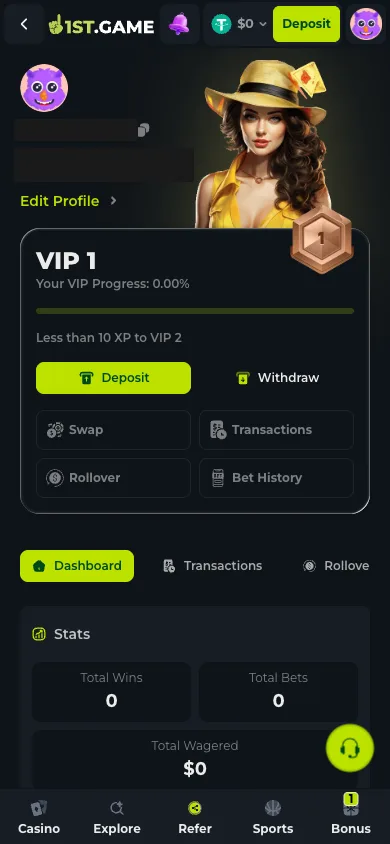
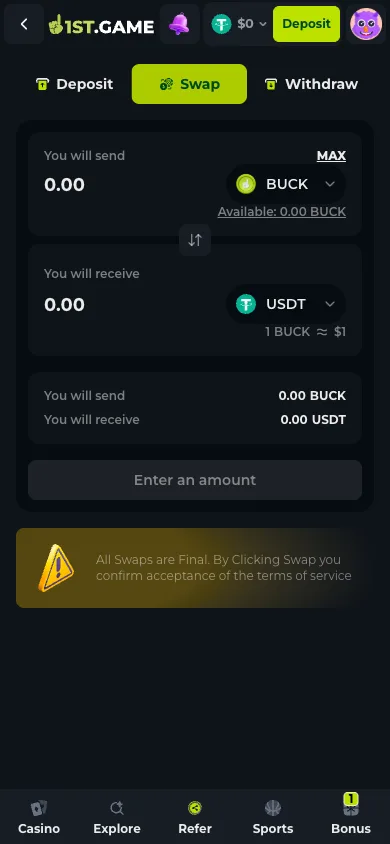
The profile screen carries a Transactions tab alongside Rollover, Free Spins and Bet History. Every movement is timestamped there, which means the state of a payout is something you can check yourself before contacting anyone. Alongside them sits Swap, a separate function for converting between the coins you hold; the swap screen carries its own warning that all swaps are final, so it is worth treating as deliberately as a withdrawal rather than as a rounding step.
Frequently asked questions
What is the minimum withdrawal at 1st.game?
The screen showed a 5 USDT floor and a 50,000 ceiling for the coin selected on 2026-08-03, with the field rejecting anything below the floor and saying so in red. Both figures are printed per coin and network, so check them again after switching either.
How long does a withdrawal take?
We did not withdraw, so there is no measured answer here and we are not going to invent one. What the interface commits to is narrower than a processing time: a note under the confirm button says large or suspicious withdrawals may take up to 24 hours. That is a stated ceiling for a review, not an average.
Why is my balance larger than the amount I can withdraw?
The screen splits the balance into available and locked. Funds attached to an active bonus or an unfinished rollover requirement sit in the locked column and are excluded from the withdrawal, including from the Max shortcut. The Rollover tab in the profile area is where the outstanding requirement is shown.
Can I withdraw to a different address than the one I saved?
The screen only offers the registered destination, which is the point of registering it. Adding or changing one is an account action rather than something done inside a payout, and doing it in advance means an attacker who reaches a live session cannot redirect funds in a single step.
Do I need to verify my identity before cashing out?
Nothing was requested during registration, and the account here never funded so we never triggered a payout review. Verify Email and Verify Phone appear as tasks in the bonus section. On any platform moving real money, identity checks tend to surface at the first withdrawal rather than at sign-up, which is a reason to complete them before you want the money rather than after.
