Navigating the game library at 1st.game
The library is larger than the front screen suggests, and the front screen is not where you should be browsing it from. The lobby leads with promotional banners, a live feed of recent wins and a Hot row, all of which are merchandising rather than navigation. The actual structure lives in the side drawer, which splits first into Casino and Sports and then lists the categories: Hot, Recents, Favorites, Slots, Live Casino, Fast Games, Lottery, Predictions, Fishing and Providers. That last one is the most useful entry and the least obvious, because it lets you approach the library by studio rather than by theme. The other thing worth knowing before you start tapping is what an individual game page shows: return-to-player percentage, maximum win multiplier, mechanic tags and a description — plus two buttons, Play and Demo Play. The second one is the reason a first session does not need to cost anything, and it is the habit this page is really about.
Contents
- Reading the lobby and the game page
- Step 1 — Open the drawer instead of scrolling the lobby
- Step 2 — Know what each category actually contains
- Step 3 — Scroll the lobby for structure, not for choices
- Step 4 — Read the game page before you tap Play
- Step 5 — Use Demo Play as the default first move
- Frequently asked questions
Reading the lobby and the game page
Two screens carry all the information that matters: the drawer, which is how you find things, and the game page, which is how you decide whether to open one.
The drawer is the real navigation
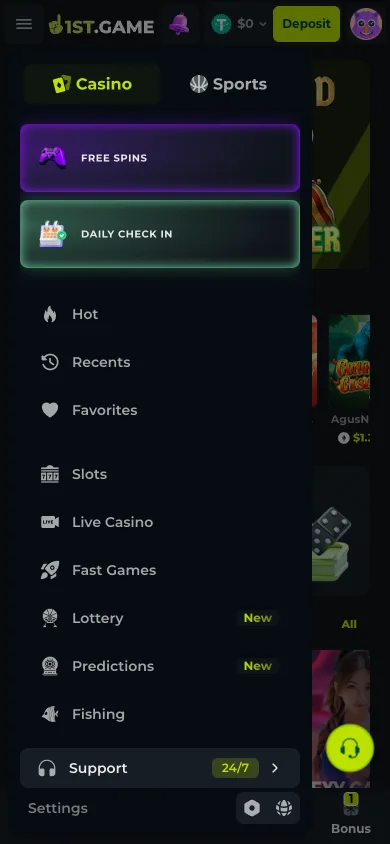
Casino and Sports split at the top, then ten entries below: Hot, Recents, Favorites, Slots, Live Casino, Fast Games, Lottery, Predictions, Fishing and Providers. Lottery and Predictions carried New badges on 2026-08-03. The lobby itself shows a curated slice; this list is the whole thing.
Providers beats themes for finding a specific game
Browsing by studio narrows the field faster than browsing by theme, because mechanics travel with the studio rather than with the artwork. If you liked one title, its siblings behave more like it than any similarly-themed game from somewhere else will.
The game page prints RTP and max win
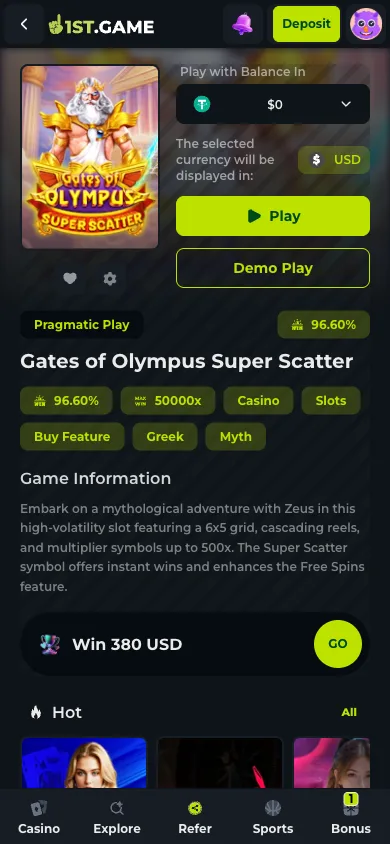
A title page carries its return-to-player percentage and maximum win multiplier as labelled chips near the heading, plus mechanic tags and a description of how the feature round works. RTP is published by the studio and describes long-run behaviour, not the session you are about to have.
Demo Play sits next to Play
Slot pages offer both. The demo runs the real game with no balance attached, which is the only honest way to learn how often a title pays and how rarely its feature triggers. Live tables and sports markets have no equivalent, because both settle against something real.
1. Step 1 — Open the drawer instead of scrolling the lobby
The hamburger at top left opens a panel with Casino and Sports as its first choice, then the category list, and at the bottom a 24/7 support row and the settings icons. Free Spins and Daily Check In are pinned above the categories as highlighted cards. This is where to start a session: the lobby underneath is organised for discovery of what is being promoted, which is a different question from what you came to play.
2. Step 2 — Know what each category actually contains
Slots is the deepest section. Live Casino streams dealers running real tables. Fast Games covers the quick-resolution formats where a round finishes in seconds rather than minutes. Fishing is a distinct arcade-style category common across Asian platforms and easy to miss if you are used to European lobbies. Lottery and Predictions were both flagged as new. Recents and Favorites only become useful once you have played, but they are the fastest route back to a title whose name you did not note.
3. Step 3 — Scroll the lobby for structure, not for choices
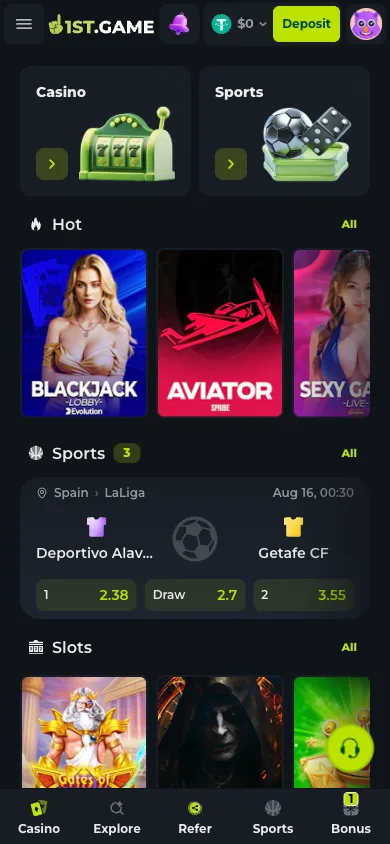
The lobby stacks a promotional banner, a live strip of recent wins with usernames and amounts, paired Casino and Sports entry cards, a Hot row, an inline sports block showing upcoming fixtures with their odds, and then category rows each with an All link. The wins strip is worth naming for what it is: a rolling feed of other people's outcomes, positioned high on the screen because it works as encouragement. It carries no information about what will happen on your account.
4. Step 4 — Read the game page before you tap Play
Opening a title gives you the studio name, the RTP as a labelled chip, a maximum win multiplier, mechanic tags such as the grid size or a buy-feature marker, and a short description of how the feature round works. The example we opened listed a 96.60% RTP and a 50,000× ceiling with a description of cascading reels and multiplier symbols. Those two numbers pull in opposite directions and both are true: a high ceiling generally means a long wait between meaningful outcomes.
5. Step 5 — Use Demo Play as the default first move
The demo button runs the actual game with no balance attached. Twenty minutes in demo tells you what a paytable cannot: how often the reels return anything, how long the dry stretches run, whether the feature triggers at a rate you have the patience for. None of that changes the mathematics — the published RTP applies over a horizon far longer than any session, and no amount of familiarity moves it — but it does tell you whether you enjoy the title before it costs anything to find out. The account-level deposit limits in settings are the other control worth setting before a first real session rather than after one.
Frequently asked questions
How many games does 1st.game have?
We did not count them and will not quote a figure we have not verified. What we can describe is the structure: ten categories in the drawer, a separate Providers view for browsing by studio, and a Sports section that runs on its own tab with live odds appearing inline in the lobby.
Can I try games without depositing?
Slot pages carry a Demo Play button beside Play, which runs the game with no balance attached. Live dealer tables and sports markets do not offer an equivalent, because both settle against a real event in real time rather than against a simulation.
What does the RTP figure on a game page mean?
Return to player is the theoretical long-run percentage of stakes a title returns, published by the studio that built it rather than set by the operator. It describes behaviour over a horizon far longer than any session, so it is useful for comparing titles and useless for predicting an evening.
Where is the sports section?
Sports has its own tab at the top of the drawer and its own slot in the bottom bar, and the lobby also carries an inline block with upcoming fixtures and their odds. It draws on the same balance as the casino side, so no separate funding step is involved.
How do I find a game again after playing it?
Recents and Favorites sit near the top of the drawer above the category list. Favorites has to be set deliberately — the game page carries a heart icon next to the settings cog — while Recents fills itself. Between them they are more reliable than trying to remember which category a title was filed under.
