Funding an account at 1st.game
Deposits and withdrawals live on one screen at 1st.game, split into three tabs — Deposit, Swap, Withdraw — and the deposit tab splits again into Crypto and Fiat. That second split matters more than it looks, because the two halves behave nothing alike. The crypto half issues you an address and a QR code and then steps out of the way: whether the money arrives depends on the chain, not on anyone at the operator. The fiat half routes you through a local method — on the connection used for this walkthrough that meant Philippine pesos with GCash, Maya, GoTyme and GrabPay, each fronted by a numbered list of channels to pick from. One warning is worth putting above everything else on this page: the same USDT can be sent over five different networks here, and sending on the wrong one is the single mistake on this screen that nobody can reverse for you. This page walks the screens in order and is explicit about the limit that no walkthrough can cover — we did not put money through, so nothing below claims how quickly a deposit lands.
Contents
- Four things the deposit screen decides for you
- Step 1 — Open Deposit and choose Crypto or Fiat
- Step 2 — Set the network before you copy anything
- Step 3 — Send a small amount first if the pairing is new to you
- Step 4 — Or switch to Fiat and pick a local channel
- Step 5 — Read the offer attached to this specific deposit
- Frequently asked questions
Four things the deposit screen decides for you
Each of these is set on the screen before you send anything, and each one is easier to get right in the thirty seconds you are looking at it than to fix afterwards.
One coin, five networks
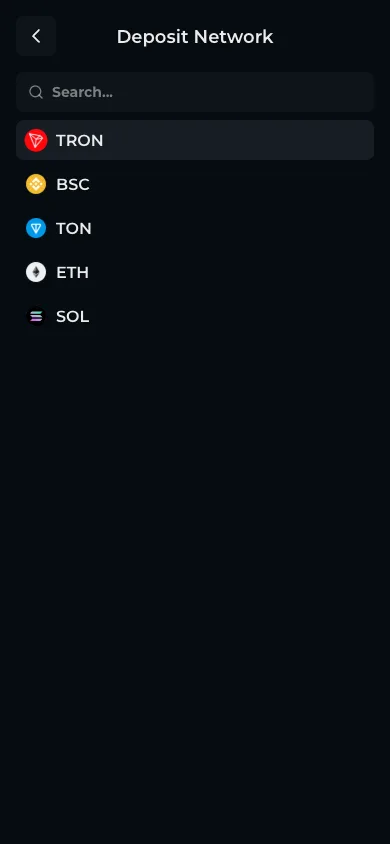
Choosing USDT opens a network list with five entries: TRON, BSC, TON, ETH and SOL. The address you are shown belongs to the pairing of coin and network, not to the coin alone. Send from a wallet set to a different chain and the transfer completes on that chain, which is not the one being watched here.
The minimum is per pairing
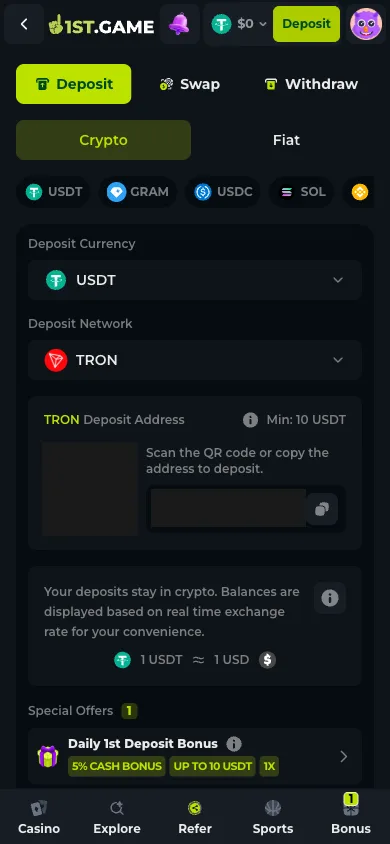
USDT on TRON showed "Min: 10 USDT" beside the address on 2026-08-03. That figure is printed next to whichever pairing you have selected and is not a single site-wide number, so read it again after you change coin or network rather than assuming it carried over.
Deposits stay in the coin you sent
A note under the address states that deposits stay in crypto and balances are displayed using a real-time exchange rate for convenience. Your funds are not converted into a house currency on arrival — the dollar figure in the header is a display layer over the coins you actually hold.
Local money runs through numbered channels
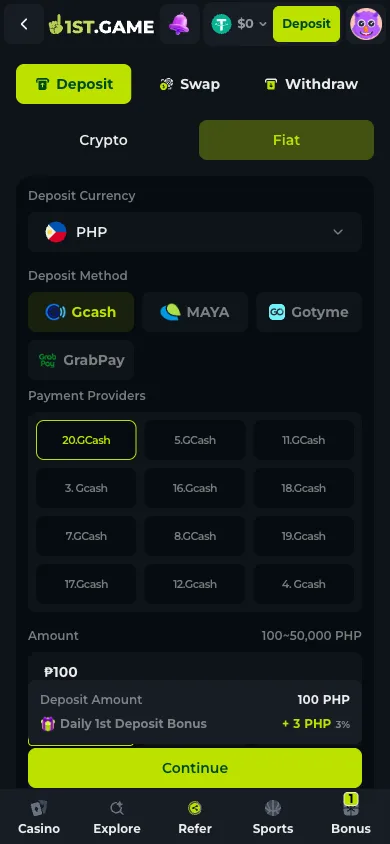
The fiat tab lists 27 currencies. Picking one exposes its local methods, and picking a method exposes a grid of numbered providers — a dozen separate GCash entries in the Philippine case. You choose one before entering an amount, and the amount field states its own range for that route.
1. Step 1 — Open Deposit and choose Crypto or Fiat
The Deposit button in the header opens the finance screen with the Deposit tab already selected, Swap and Withdraw sitting beside it. Directly underneath, a Crypto / Fiat toggle decides everything that follows. The crypto side runs a row of coins across the top — USDT, GRAM, USDC, SOL, BNB, ETH, TRX, BTC and NOT — and then two dropdowns: deposit currency and deposit network. Below those sits the address block with its QR code, and below that the offers that apply to this deposit, which on the day showed a daily first-deposit cash bonus of 5% up to 10 USDT at a 1× rollover.
2. Step 2 — Set the network before you copy anything
Tap the network dropdown and a full-screen list opens with a search box: TRON, BSC, TON, ETH, SOL. This is the step that costs people money, and it costs them silently — a wallet will happily send USDT over BSC to an address the platform is only watching on TRON, the transfer will confirm, and the balance here will not move. Set the network to match the chain your sending wallet is actually on, then copy the address, in that order. Changing the network after copying gives you a different address and the one on your clipboard becomes wrong.
3. Step 3 — Send a small amount first if the pairing is new to you
The address block offers both a QR code and a copy button. Whichever you use, the sensible habit on a first transfer to any new destination is a test amount at or just above the stated minimum, confirmed as arrived, before anything larger follows. It costs one extra network fee. The alternative, on a chain, is not a support ticket — a blockchain transfer cannot be recalled by the operator or by anyone else, which is precisely why the extra fee is worth paying once.
4. Step 4 — Or switch to Fiat and pick a local channel
The Fiat tab replaces the coin row with a currency selector holding 27 entries — PHP, VND, THB, IDR, MYR, INR, BDT, PKR, KRW, BRL, MXN, NGN and others. The connection used for this walkthrough defaulted to PHP, which offered GCash, Maya, GoTyme and GrabPay, and then a grid of numbered providers beneath the chosen method. Those numbered entries are separate processing channels rather than different wallets; you select one, then an amount. The PHP screen stated a range of 100 to 50,000 and showed the bonus each preset amount would add, starting at three pesos on a hundred.
5. Step 5 — Read the offer attached to this specific deposit
Under the amount, the screen lists the special offers that apply to the deposit you are about to make, with the percentage, the cap and the rollover multiplier on the same line. On 2026-08-03 the crypto route showed 5% up to 10 USDT at 1×, the PHP route 3%. These are per-route and per-day figures rather than a standing promise, and they are the version you should read — not the number on a banner, and not the number on this page, which was true on one day for one account.
Frequently asked questions
Which network should I choose for a USDT deposit at 1st.game?
The one your sending wallet is actually using. TRON usually carries the lowest fee of the five offered, but the correct answer is always whichever chain the coins are leaving from — cheapness is irrelevant if the funds land on a chain the deposit address is not watching.
What happens if I send on the wrong network?
The transfer confirms on that chain and the balance here does not move. Recovery depends entirely on whether the operator can reach that chain and is willing to act manually. Plan on the answer being no, and treat the check on the network dropdown as the moment that decides the outcome.
How long does a deposit take to appear?
We cannot answer this from experience: no money was deposited during this walkthrough, and a number invented for the sake of completeness would be worse than the gap. Mechanically, a crypto deposit waits on block confirmations rather than on office hours, so the chain and its current congestion set the pace. Fiat channels depend on the provider you picked from the numbered grid.
Is there a minimum deposit?
Yes, and it is shown next to the address for the exact coin and network you have selected — USDT on TRON read "Min: 10 USDT" on 2026-08-03. Fiat routes state their own range in the amount field instead; the PHP screen showed 100 to 50,000. Check it after every change of currency or method rather than once.
Do I keep the coin I deposited, or is it converted?
You keep it. The screen states that deposits stay in crypto and that balances are shown using a live exchange rate for convenience, so the dollar amount in the header is a presentation of the coins you hold. Converting between them is a separate, deliberate action on the Swap tab.
