Registering an account at 1st.game
Most "how to sign up" pages describe a form the writer never opened. This one was opened on 2026-08-03, on a phone-sized screen, and photographed at every step. The short version: the form asks for exactly two things — an email address or phone number, and a password — and there is no SMS code and no confirmation email between you and a working account. What there is instead is a challenge widget that appears after you press Sign Up, the kind where you drag a shape into place or tap the one that keeps growing. Clear it and the account exists immediately; the balance screen and a first-task panel load without a further step. Two details are worth knowing before you start rather than after. The interface picks its language from where your connection appears to be, not from your browser, so an English speaker may well land on a Chinese or Portuguese page and need to change it manually — that switch is buried at the bottom of the side drawer, not in the header. And the username is not yours to choose: the account is issued with a numeric ID and a random handle, both visible on the profile screen.
Contents
What the form does and does not ask for
Four things stood out against the pattern most gambling sites follow. None of them are a verdict on the platform — they are simply what the screens showed on the day, and each one changes what you should have ready before you start.
Two fields, both checkboxes pre-ticked
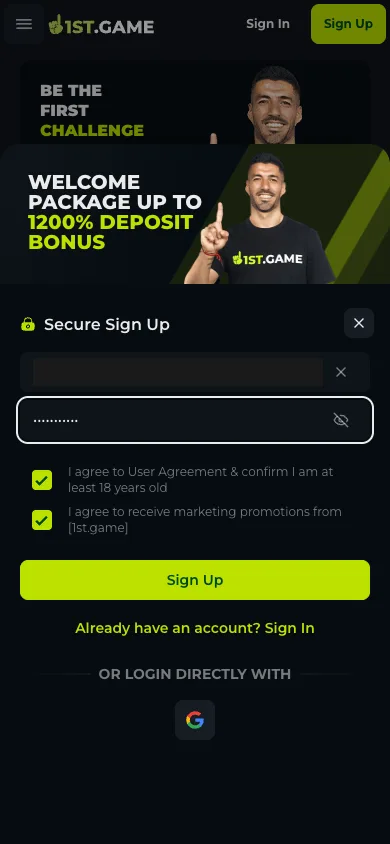
Email or phone number, plus a password. Below them sit two boxes, already ticked when the panel opens: one confirms you are at least 18 and accept the user agreement, the other opts you into marketing messages. The second one is yours to untick — it is not required to open the account.
The captcha comes after, not before
Press Sign Up and the form does not submit straight away. A challenge widget loads — drag a piece into a gap, or tap the shape that is growing — with a refresh arrow and a skip button that only swaps in a different puzzle. Clear it and the account is created in the same breath.
No SMS code, no confirmation email
Nothing was sent to the address used at sign-up, and no phone verification appeared. Email and phone verification exist, but as optional achievement tasks inside the bonus section rather than as gates on registration. Expect them to matter later, when a payout is being reviewed, rather than now.
The username is assigned, not chosen
There is no "pick a username" field. After sign-up the profile screen shows a ten-digit account ID and a randomly generated handle. Both are what support and the transaction history refer to, so it is worth storing them somewhere other than your memory of the session.
1. Step 1 — Open the site and check which language loaded
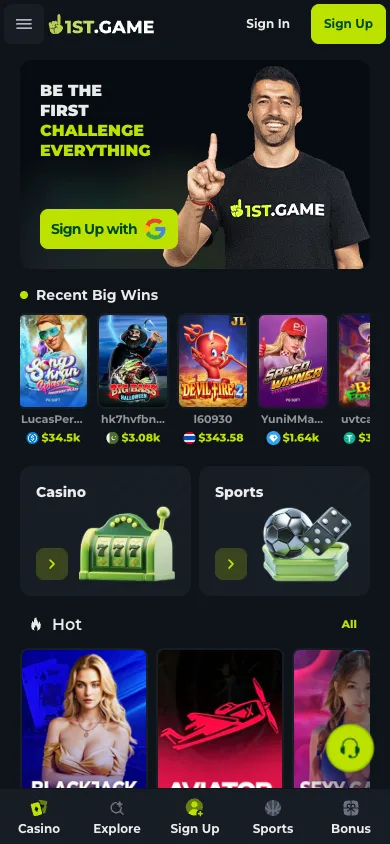
The address resolves straight to the platform: no intermediate redirect page, no country splash screen to tap through. The header carries Sign In and Sign Up, and a five-slot bar sits along the bottom of the phone screen — Casino, Explore, Sign Up, Sports, Bonus. If the page is not in a language you read, do not fight it: open the drawer from the hamburger at top left, scroll to the Settings row at the very bottom, and tap the globe icon beside it. The list holds English, Español, Português, Tiếng Việt, 日本語, 한국어 and both Chinese scripts. The change applies instantly and sticks for the session.
2. Step 2 — Fill the two fields
Tapping Sign Up slides a panel up from the bottom titled Secure Sign Up, under a banner advertising a welcome package. The first field accepts either an email address or a phone number; the second is the password, with an eye icon to reveal what you typed. Use an address you will still control in six months, because it is the handle you will log in with and the only route back into the account if the password goes missing. Below the fields, read the two pre-ticked boxes before moving on — the marketing one is optional and stays ticked unless you clear it.
3. Step 3 — Clear the challenge widget
The Sign Up button triggers a puzzle rather than an immediate submit. On this run it appeared twice in two forms: once asking for a shape to be dragged into position, once asking for the shape that was growing to be tapped. The skip button does not bypass the check, it only loads a different puzzle, and the circular arrow reloads the same one. This is the one step of the process that genuinely needs a person; there is nothing to prepare for it beyond a steady connection.
4. Step 4 — You are already logged in
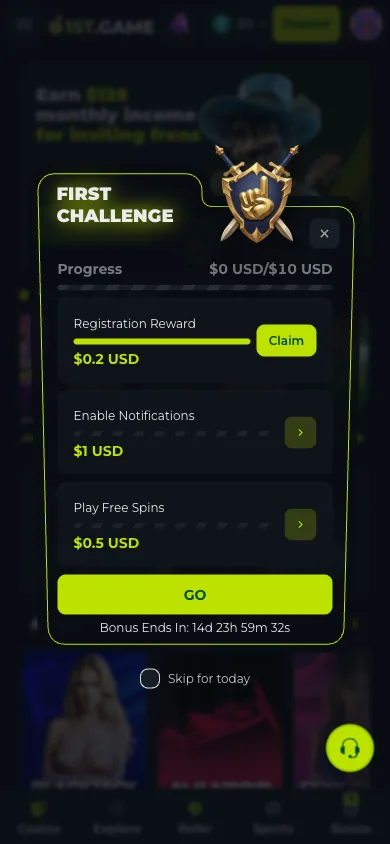
There is no "check your inbox" screen. The moment the challenge clears, the account exists and the session is live: the header switches to a balance chip reading $0 with a Deposit button beside it, and a panel headed First Challenge opens over the lobby. It lists three small tasks against a progress bar — claim the registration reward, enable notifications, play the free spins — each worth a fraction of a dollar, with a countdown of roughly fifteen days attached. The amounts are small enough that the real value is the tour: each task walks you through a part of the interface you would otherwise have to find.
5. Step 5 — Note your ID before you close the panel
Open the avatar at the top right and the profile screen shows a ten-digit account ID above a randomly generated username, with a copy icon next to the ID. Neither was chosen at sign-up and neither is obvious from your email address, so copy them somewhere durable now. The same screen carries the VIP tier and its progress bar, shortcuts to deposit, withdraw, swap, transactions, rollover and bet history, and — under Settings — the language and game-currency switches.
Frequently asked questions
Does registering at 1st.game require a phone number?
No. The form on 2026-08-03 accepted an email address in the same field, and the account was created without a phone number and without any SMS code. Phone verification exists as an optional task in the bonus section, not as a requirement at sign-up.
Why is the site not in English when I open it?
The interface picks its language from where the connection appears to originate rather than from your browser settings, so the first load can be in Chinese, Portuguese or something else entirely. Change it from the side drawer: hamburger at top left, scroll to the Settings row at the bottom, tap the globe icon, pick English. It applies immediately.
Can I sign up with Google instead?
Yes — the panel carries a Google button under "or login directly with", and the hero banner on the logged-out home screen offers the same route. This walkthrough used the email path, so we did not photograph the Google flow and will not describe screens we have not seen.
Do I have to verify my identity before I can play?
Nothing was requested during registration or immediately after it. Verify Email and Verify Phone appear as achievement tasks in the bonus area, which suggests they are encouraged rather than enforced up front. Identity checks on platforms that move real money usually surface at the first withdrawal, so completing them early costs you nothing and removes a step from the point where timing matters.
Is the welcome bonus applied automatically?
The banner above the sign-up panel advertises a welcome package tied to deposits rather than to registration, and the deposit screen showed its own daily first-deposit offer already marked as eligible. We did not deposit, so we cannot confirm from experience how the credit lands or what the wagering terms turn out to be — read the terms attached to the specific offer on the deposit screen before funding.
